Fact-check a YouTube video without leaving the page.
Press one button. We pull the claim from the captions, check it against published sources, and show you the verdict.
See the extension working.
Four steps. Zero tab-switching.
This is interactive, give it a try!
What happens when you press Fact-check
- 1
A claim catches your ear.
You are watching a video and a presenter says something that sounds off. You do not have to pause or switch tabs.
- 2
You press Fact-check.
One click on the button that sits on top of the player. The video pauses or keeps playing depending on your settings.
- 3
We read the transcript.
WasThatTrue scans the captions from around the last thirty seconds. Human speech is muddy, so a lightweight AI agent rewrites the raw lines into clear, checkable claims.
- 4
You pick the claim.
The extension shows you the claims it found and you choose which one to verify. This step runs every time, including when only one claim was found, so a credit is never spent on a claim you did not ask to check.
- 5
You press Verify.
Nothing is checked until you confirm exactly what should be checked. You stay in control of every call.
- 6
We search the open web.
Perplexity Sonar retrieves and ranks published sources relevant to the claim, then summarises what they say. We never invent a citation.
- 7
You read the verdict.
A panel opens with the verdict, a confidence level, a plain-English explanation, and the sources used. Click any source to read it for yourself.
What makes a verdict trustworthy
Three things keep the verdict honest, even when the question is hard.
What counts as a fact
Opinions, predictions, and rhetorical questions get filtered out before anything is checked. Only declarative claims that can be tested against published evidence make it through. “This is unfair” is an opinion. “Spending rose 12% between 2020 and 2024” is a claim.
Sources we trust
Tier-1 fact-checkers get extra weight when they have already looked at the claim: PolitiFact, AFP Fact Check, Full Fact, FactCheck.org, Reuters Fact Check. Beyond those, the source pool is published outlets, journals, and reference sites retrieved live from the open web. Every citation links to a real article you can read for yourself.
When we refuse to call it
If credible sources disagree, the verdict is Contested. If no sources turn up, it is Unverifiable. We never force a True or False when the honest answer is that the evidence is mixed or missing. You decide what to make of it.
Tune it to your taste
Open the WasThatTrue popup from your Chrome toolbar to adjust how it behaves.
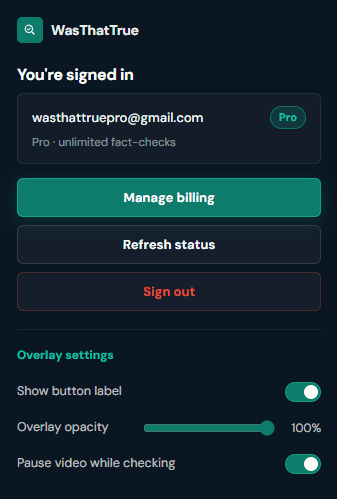
Show button label
Switch between the full pill button and an icon-only mark for a more discreet look on the player.
Overlay opacity
Slide the verdict panel lighter or darker so it sits over the video the way you like to read.
Pause video while checking
On by default. Turn it off if you want the video to keep playing while a check runs.
Want the technical deep dive?
Models, claim extraction, source retrieval, verdict building. The whole pipeline, written up.
Read: How WasThatTrue sources its evidenceQuick answers
Do I need to type anything?
No. WasThatTrue reads the live captions around the moment you pressed the button and pulls out the exact claim being made. The thing you heard is the thing we check, no searching or rewriting required.
What if the video has no captions?
We need captions to read the claim, so if a video has them disabled we tell you we cannot check this one rather than make something up. Most long-form YouTube videos have captions, either uploaded by the creator or auto-generated.
Does it work on Shorts?
Not at launch. WasThatTrue is built for long-form videos on desktop Chrome, where the misinformation problem is most concentrated and where viewers stay long enough to actually want a verdict. Shorts and mobile may come later once the core product is solid.
Why does it sometimes say Contested instead of True or False?
When credible sources disagree, or the evidence is genuinely mixed, forcing a True or False would be dishonest. Contested lets you see the disagreement instead of a fake consensus. Read the sources and decide for yourself.
Where do the sources come from?
Published outlets, journals, and reference sites that a search engine would already surface. We never invent a citation, and we never link a source without checking it exists. The sources blog post walks through the retrieval pipeline.
What does it cost?
There is a free tier for casual viewing and a Pro tier that removes the daily limit. See Pricing for the current plans and what each one includes.
Stop wondering.
Check the claim.
Add WasThatTrue to Chrome and get source-backed verdicts on YouTube, right where the claim was made.
Desktop Chrome only. Free to install. No credit card required.